Netatmo Thermostat Pairing Wizard NOT WORKING

Netatmo Smart Thermostat Pairing wizard for windows not working, stays stuck on "Please Check your internet connection".....
Computer has connection, no firewall. Seems a problem already encountered months ago by other users previously and then fixed by dev team. Is it possible to look into it again??
It has been 2 months now since it stopped working again.
Comments
20 comments
Same shit...
Same problem, someone have found a solution ?
This has happened several times in the past and Netatmo always fixed this pairing program immediately, but now they have fixed all the other programs but intentionally didn't fix this pairing program because they want you to send the thermostat with the relay to France and pay €44 plus shipping for the pairing.
Même problème et aucune réponse cohérente de Netatmo.
Le SAV Netatmo est catastrophique. Il ne résout aucun problème et ne répond même pas à votre demande lorsque vous formulez clairement votre problème. C'est aberrant, il ne devrait pas exister, je ne recommande à personne d'acheter la marque Netatmo !
Any news on this? The wizard stays stuck in "Checking Internet Connection". I have a realy and a thermo with different serial number and I need to pair...how can I proceed?
Please fix the damn program. I will never buy anything from Netatmo again...
Dear support please fix this problem, thank you
We had a Netatmo battery thermostat replaced that was pairing perfectly well but the screen was unreadable. It was replaced by a Homeserve electrician. However, the new thermostat wouldn't pair with the relay or app, nor apparently, with the boiler, which now comes on randomly. It seems to override the set programme, e.g. coming on at 3 a.m. despite being set to only come on after 7.
Please fix this issue!
I have tried running every version of the app (windows , mac , linux ) and it doesn't work. I think this app is trying to talk to a server that does not exist anymore. I am not smart enough do decompile the app so we are at netatmo's mercy ! Edit : I WANT TO EXTEND MY HEARTFELT THANKS TO laura.hall4 AND HER METHOD AFTER MONTHS WITH A DUMB THERMOSTAT IT FINALLY WORKS
This app (Netatmo Thermostat pairing wizard) is trying to connect to app.netatmo.net server which is alive. Unfortunately, the app is old (2015), is using TLS1.0 and the lowest TLS version the server accepts is TLS1.2, so the server declines the connection.
Netatmo, please release a new version of the app which will use TLS1.2/TLS1.3.
I have the same problem. Can you pls advice where we can get the App which is working?
If such an app exists, unfortunately it is not publicly available.
The apps I know about are here. The one which we need to be updated by Netatmo is NetatmoThermostat_PairingWizard_OS.
want advice? change brand. no answer for almost a year on a blocking SW problem is absurd…
If anyone is still struggling with this and resents having to spend money as a result, I managed to work around it to pair a new relay to my thermostat after the old relay broke. Not an easy solution, but if you're like me and don't want to spend money on a new thermostat, it's worth spending some time. Obviously the Mac app on pairing.netatmo.com doesn't work on modern Macs, so I ended up running the Linux version of the wizard inside an old Ubuntu VM and use nginx locally as a TLS compatibility proxy. This is what I did:
My setup:
- Apple Silicon Mac
- UTM
- Ubuntu 18.04.6 x86_64 VM
- Netatmo relay connected by USB and passed through to the VM
- Netatmo Linux pairing wizard from pairing.netatmo.com
Official wizard download:
Install dependencies:
Create compatibility SSL links:
Create a local certificate:
Redirect Netatmo hostnames to localhost:
Configure nginx:
Run the wizard:
The wizard itself is very straightforward once you get it running.
Many thanks lhall4 !!!
I tried doing something similar using ChatGPT, but I wasn't successful. I'll give it another try later by following your instructions when I get a chance.
I hope it works for you. It took me around 2 hours of experimenting to get something that worked, but I was too stubborn to let it go!
So the program doesn't have to be connected to the Netatmo server to pair the relay with the thermostat? Could someone who understands Linux please create an easy procedure? Netatmo told me that they are intentionally not updating the application because they want us to switch to their new thermostat ORIGINAL.
It does need to connect to the server. The problem (thanks to Dumitru's post above) is that the TLS version in the app is out of date and doesn't match the one the server needs. So this workaround makes the server think it's getting what it is looking for. It would be a very easy fix for Netatmo so it does seem like deliberate obsolescence.
Hi lhall4,
Following your instructions, I was able to get past the “checking network connection” screen and also connect the USB to the VM.
But now I'm stuck on this step...
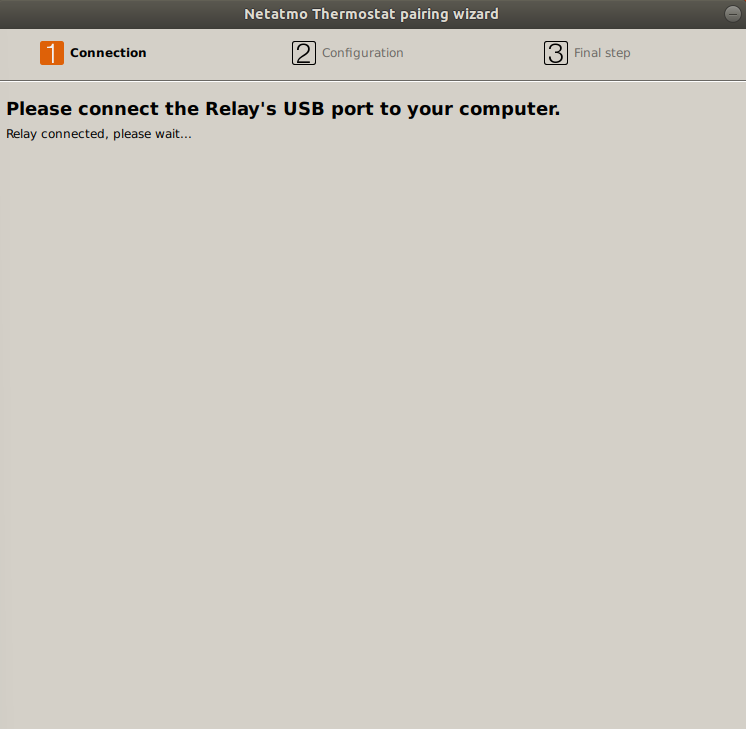
It's been several minutes, and I doubt it's doing anything... Did this happen to you?