Serial number
The serial number (S/N) is composed of one letter followed by six characters (e.g., gxxxxxx).
- On the product: at the top of the Camera.
Open the cover as shown in the pictures below. Use the palm of your hand to turn the cover counterclockwise and pull it up. The serial number is underneath.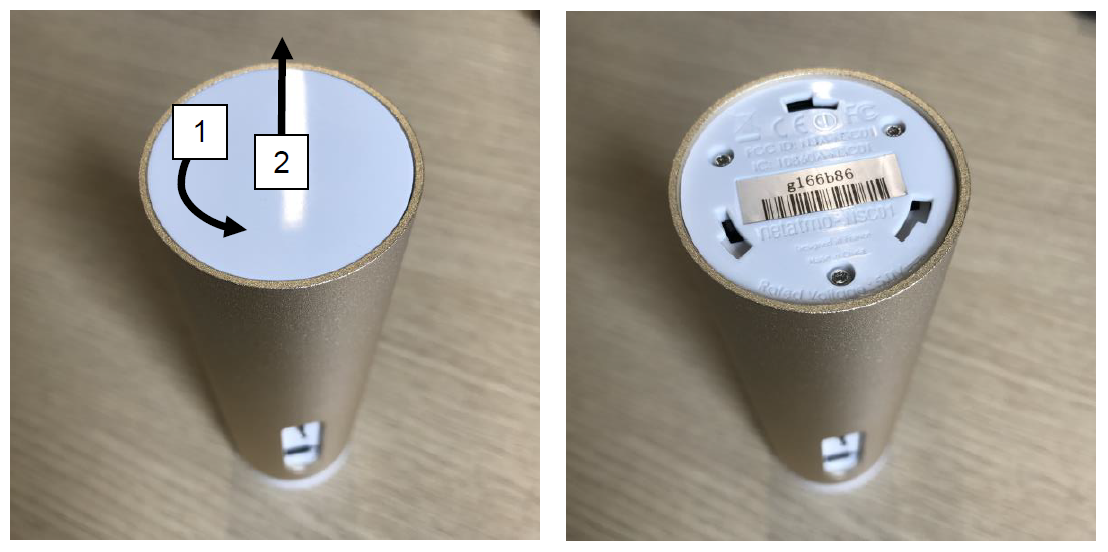
- On the packaging.
MAC address
The MAC address can be useful for establishing a connection on secure networks.
You can find the MAC address of the camera:
- In the Home + Security app:
- Go to Settings > Manage my Home.
- Select the room where the product is located.
- Click on the module and scroll down to see its MAC address at the "Serial number" line.
- By deduction: the MAC address can be deduced from the serial number. Simply replace the letter ‘g’ in the serial number with ‘70:ee:50’ and complete it with the final six characters of the serial number. For example, if the serial number is g123456, the MAC address is 70:ee:50:12:34:56.
Smart Indoor Siren
The Siren's serial number can be found:
- If your Siren is already associated with your account, in the application settings: Manage my home > [Siren's room] > [Siren's name] => Serial number.
- On the packaging
- At the back of your Smart Indoor Siren
Updated